All over the world many have been having the opportunity of watching free cable tv,but in africa and some part of the world they are deprived,hence ,we will introduce just this three devices but base on cost we will like to lay more emphasis on Chromecast.
The wireless Web-to-TV device that streams Netflix, HBO Go, Hulu Plus, and more.Google's Chromecast is like a more limited version of an Apple TV or Roku. It's a small wireless video dongle that streams Netflix, YouTube, HBO Go, Hulu Plus, Pandora, and Chrome to television sets using Android or iOS tablets as remotes. It retails for #11,000 (nigeria currency) including shipment.
This will be supplied within 5 working days irrespective of order.The good thing about the device is more flexible and movies are on HD in respective of your tv
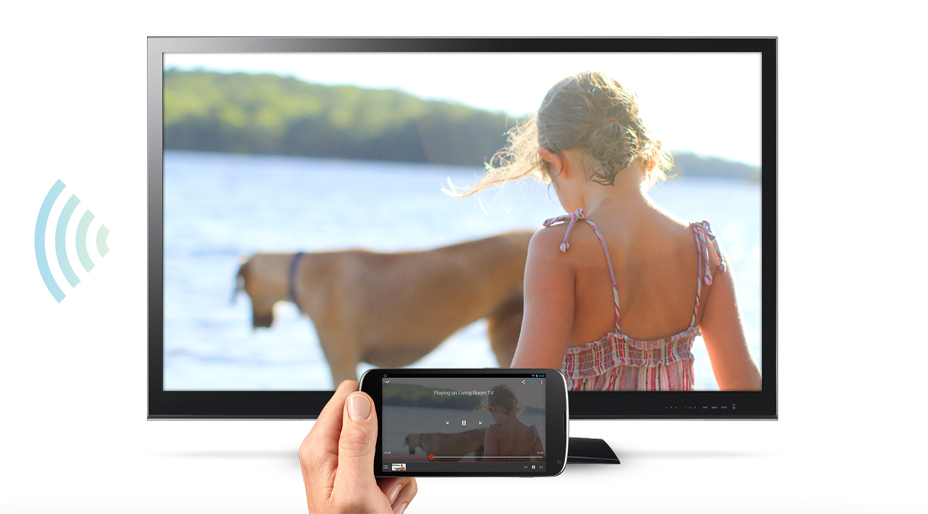
Chromecast is the easy way to enjoy online video and music on your TV.
Plug it into any HDTV and control it with your existing Android
smartphone or tablet, iPhone®, iPad®, or laptop. No remotes required.
Cast your favorites from Netflix, YouTube, HBO GO, Hulu Plus, Pandora,
Google Play Movies & TV, Google Play Music, and Chrome* to your TV
with the press of a button.
Product Features
Content you love, with even more to follow
Chromecast supports Netflix, YouTube, HBO GO, Hulu Plus, Pandora, Google Play Movies & TV, Google Play Music and Chrome*. Chromecast will automatically update to work with a growing number of apps.No learning curve
Chromecast taps into the same app and browsing experience you're familiar with on your smartphone, tablet, and laptop, so there's nothing new to learn. Just open a supported app, press the cast icon, then sit back and enjoy.Remote-free
Browse for what to watch, control playback, and adjust the volume using the smartphone, tablet, or laptop you already know how to use.Works with Android, iOS, Windows, and Mac
Chromecast works with Android smartphones and tablets, iPhone® and iPad® devices, Chrome (for both Windows and Mac®), and Chromebook Pixel. Support for other Chromebooks coming soon.Multitask without interruption
Switch to another app, open a new browser tab, or let your device go into sleep mode while you continue to watch your favorites on the TV, all without draining the battery on your smartphone, tablet or laptop.Cast the Web to your TV*
With Chromecast, cast a Chrome browser tab with anything fromPlug in and play
Stays out of sight
Chromecast is designed to plug directly into the back of your TV, slipping out of view. It's a small device in its category, making it easy to set up on any TV in your house.For everyone
Friends and family can use your Chromecast with their phones and tablets without having to set up anything, as long as they're connected to the Wi-Fi network at your house.
High-definition entertainment
Chromecast supports up to 1080p video resolution, so you won't lose picture quality from high-def sources.
*Casting from Chrome feature is currently in beta.
remote control , you can use Chromecast to access video content
from Netflix, YouTube, Hulu Plus and the Google Play Store. You can
also use it to stream almost any kind of content from the Chrome browser
on a computer.
growing number of apps.



Set up Chromecast
You
can set up your Chromecast in a snap using either an Android or iOS
phone or tablet or a Mac, Windows or Chromebook Pixel computer. You only
need to set up your Chromecast once - you can cast from additional
supported devices without having to set up Chromecast again. Before you
begin the setup process, make sure you are connected to a 2.4 GHz Wi-Fi
802.11 b/g/n Wi-Fi network.
Get started with Chromecast by visiting www.google.com/chromecast/setup on a device that is running a supported operating system:

Get started with Chromecast by visiting www.google.com/chromecast/setup on a device that is running a supported operating system:
- Android Gingerbread 2.3 & higher
- iOS6 & higher
- Windows 7 & higher
- OS X 10.7 & higher
- Chrome OS (Chromebook Pixel on Chrome 28 & higher)
| For additional setup assistance, select the device you are using to set up Chromecast from the options below: |
Please note: Your Wi-Fi network
configuration may prevent you from setting up Chromecast successfully.
If you are having trouble connecting Chromecast to your Wi-Fi network,
please see our Chromecast troubleshooter here or see Chromecast router known issues and workarounds here.
Mac OS and OS X are registered trademarks of
Apple Inc. Windows is a registered trademark of Microsoft Inc. iOS is a
trademark or registered trademark of Cisco Inc. The Netflix logo is a
trademark of Netflix, Inc. Netflix is available in certain countries.
Unlimited streaming membership required. More information at
www.netflix.com.
You can even throw content from your Chrome browser to the big screen. The Chromecast stick includes a USB cable for power and a power adapter.
If your TV has a USB port, you can plug the power cable right in. If
not, you can use a wall adapter. You can control the device with
smartphones or tablets running Android or iOS, as well as computers
running the Windows or Mac operating systems.
faq about chromecast
Q.: What is Chromecast?
A.: Chromecast is a device that you plug into your TV's HDMI port, powered by a USB cable (included). Using your smartphone or computer as aQ.: What do I need for Chromecast?
A.: At bare minimum, you'll need a Chromecast stick, an HDTV with a spare HDMI port, a stable Wi-Fi connection and a computer or mobile device. The Chromecast stick includes a USB cable for power and a power adapter. If your TV has a USB port, you can plug the power cable right in. If not, you can use a wall adapter. You can control the device with smartphones or tablets running Android or iOS, as well as computers running the Windows or Mac operating systems.growing number of apps.
Remote free
Chromecast works with devices you already own, including Android tablets and smartphones,
iPhones®, iPads®, Chrome for Mac® and Chrome for Windows®. Browse for what to watch,
control playback, and adjust volume using your device. You won't have to learn anything
new.


Plug in and play
Get started in 3 easy steps: plug Chromecast into any HDTV, connect it to WiFi, then send
videos and more from your smartphone, tablet or laptop to your TV with the press of a
button
See it in action
See it in action

Chromecast
Everything you love, now on your TV.
CONTACT :
BJCOMMUNICATIONS LTD
FOR SALES,SUPPLY AND INSTALLATION
+2348034623519
+1559-375-6037 viber/Tango

No comments:
Post a Comment